Ansible Labs

Intro
- This tutorial is for teaching Ansible through hands-on labs designed as practical exercises.
- Each lab is packaged in its own folder and includes the files, playbooks, and assets required to complete the lab.
- Every lab folder includes a
READMEthat describes the lab’s objectives, tasks, and how to verify the solution. - The Ansible Labs are a series of Ansible automation exercises designed to teach players Ansible skills & features.
- The inspiration for this project is to provide practical learning experiences for Ansible.
Pre-Requirements
- This tutorial will test your
AnsibleandLinuxskills. - You should be familiar with the following topics:
- Basic Linux commands
- Linux File system navigation
- Basic knowledge of
Docker(if you choose to run it with Docker) - Basic knowledge of YAML
- For advanced Labs:
Ansiblebasics (inventory,playbooks,modules)
Usage
- There are several ways to run the AnsibleLabs Labs.
- Choose the method that works best for you.
Using Docker is the easiest way to get started locally with the labs:
Prerequisites:
- Docker and Docker Compose installed on your system
- No additional setup required
- The easiest way to get started with the labs
- Learn in your browser without any local installation
Benefits:
- No installation required
- Pre-configured environment
- Works on any device with a web browser
- All tools pre-installed
For those who prefer to run it directly on their machine:
# Clone the repository
git clone https://github.com/nirgeier/AnsibleLabs
# Change to the Labs directory
cd AnsibleLabs/Labs
# Start with the setup lab
cd 000-setup
# Follow the instructions in the README of each lab
cat README.md
Prerequisites:
- A Unix-like operating system (Linux, macOS, or Windows with WSL)
- Basic command-line tools
- Google Cloud Shell provides a free, browser-based environment with all necessary tools pre-installed.
- Click on the
Open in Google Cloud Shellbutton below:

- The repository will automatically be cloned into a free Cloud instance.
- Use CTRL + click to open it in a new window.
- Follow the instructions in the README of each lab.
Benefits:
- No local installation required
- Pre-configured environment
- Works on any device with a web browser
- All tools pre-installed
- Free tier available
- Ensure you have the necessary permissions to run Docker commands or Ansible playbooks on your system.
- Enjoy, and don’t forget to star the project on GitHub!
Preface
What is Ansible?
Ansibleis an open-source automation tool for IT tasks such as configuration management, application deployment, and task automation.AnsibleisConfiguration Managementtool which manage thestateof our servers, install the required packages and tools.- Other optional use cases can be
deployments,Provisioning new servers - The most powerful feature of
Ansibleis the ability to manage huge scale of servers regardless of their infrastructure (on prem, cloud, vm etc) Ansibleuses SSH to connect to servers and execute tasks defined in YAML playbooks, making it agentless and easy to use.Ansibleis widely used for managing infrastructure, ensuring consistency, and automating repetitive processes across various environments (on-premises, cloud, VMs, etc.).
How Ansible Works
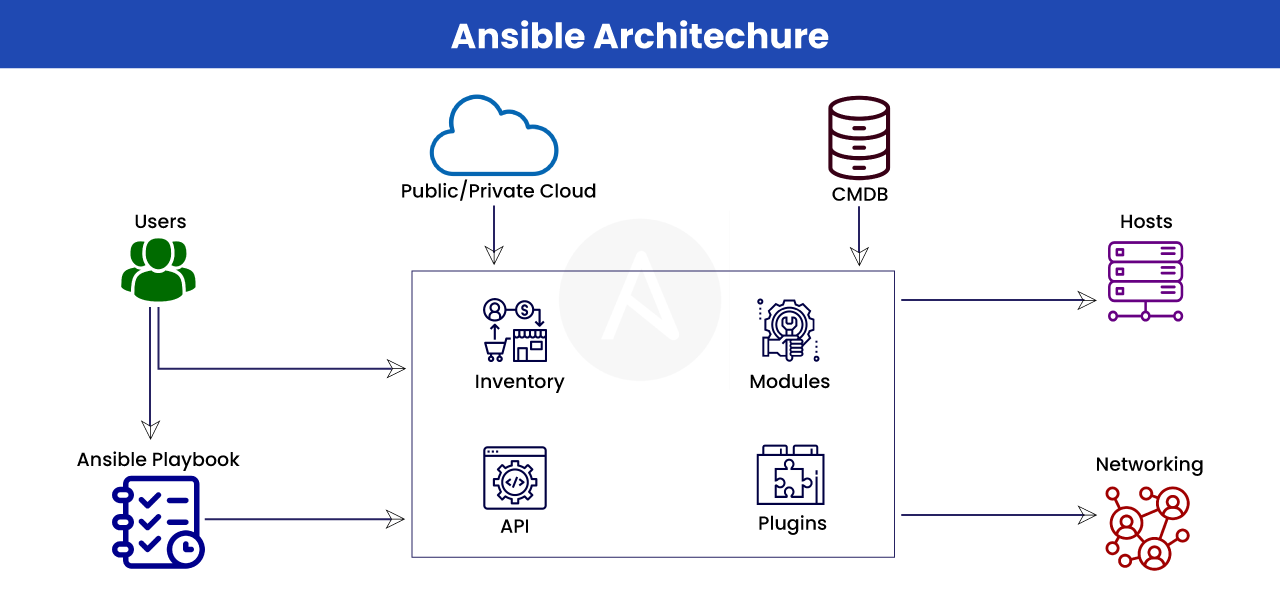
- Ansible is an
agentless tool. - Ansible uses
sshforpulling modulesand for managing the nodes - Ansible is based upon
YAML - An
Ansible playbookis a file that contains a set of instructions that Ansible can use to automate tasks on remote hosts. Playbooksare written inYAML, a human-readable markup language. A playbook typically consists of one or moreplays, a collection of tasks run in sequence.
How Ansible Playbooks Work
- Here’s a brief overview of how
Ansible playbookswork:
-
Playbook Structure
- A
playbookis composed of one or moreplaysin an ordered list. - Each
playexecutes part of the overall goal of theplaybook, running one or more tasks. - Each task calls an
Ansiblemodule.
- A
-
Playbook Execution
-
A
playbookruns in order from top to bottom. -
Within each
play, tasks also run in order from top to bottom. -
Playbooks with multiple
playscan orchestrate multi-machine deployments.
-
-
Task Execution
-
Tasksare executed bymodules, each of which performs a specific task in a playbook. -
There are thousands of
Ansible modulesthat perform all kinds of IT tasks.
-
-
Reusability
-
Playbooksoffer a repeatable, reusable, simple configuration management and multi-machine deployment system. -
If you need to execute a
taskwithAnsiblemore than once, write aplaybookand put it under source control.
-
- Playbooks are one of the core features of Ansible and tell Ansible what to execute.
- They are used in complex scenarios.
- They serve as frameworks of pre-written code that developers can use ad-hoc or as a starting template.
- They can be saved, shared, or reused indefinitely, making it easier for IT teams to codify operational knowledge and ensure that the same actions are performed consistently.